
For many general contractors, running a construction business can feel like a never-ending cycle of putting out fires, chasing down details, and juggling way too many hats. You might have the skills to build a house, but building a business that runs smoothly without you involved in every decision? That’s a whole different kind of construction project.
If you’re tired of the chaos, inconsistent profitability, and being stuck in the day-to-day, there’s a proven process to help you break free. It’s called the MAPS Method, a simple but powerful framework to organize your general contracting company, create construction business systems, and finally gain back time and control.
Let’s walk through the four steps of MAPS: Map, Align, Prioritize, and Systemize, and how you can implement each one to build a self-managing business.

Step 1: MAP – Get Everything Out of Your Head (and Theirs)
The first step to organizing any construction company is to map out what everyone actually does.
Too many contractors assume their team knows what’s expected, or worse, the business depends on one person (often the owner) to hold everything together. That creates chaos, burnout, and a business that collapses the moment you step away.
Instead, grab a whiteboard or word doc and have each key employee do a brain dump of:
- Daily and weekly tasks
- Their core responsibilities
- What they believe is most important in their role
- Tasks they share with others
- Challenges or repeated frustrations
This includes field crew leads, admin staff, project managers, estimators, and yourself, even if you’re wearing multiple hats right now. Don’t worry about formatting or grammar. This is about clarity, not perfection.
What you’ll get is a raw but powerful overview of what makes your business tick and where it’s at risk of breaking.
Pro Tip: If you’re using Buildxact, you can start associating tasks and workflows inside the platform for each role, making future documentation easier.
Step 2: ALIGN – Clean It Up and Organize for Clarity
Once everything is mapped out, it’s time to align the chaos into clarity.
Start by reviewing the task lists and asking questions like:
- Are there overlapping responsibilities causing confusion?
- Are some tasks falling through the cracks?
- Where are the bottlenecks or repeated delays?
- What doesn’t belong in a role anymore?
- What would a streamlined version of each job look like?
This stage is about refining what matters. Combine duplicate tasks, clean up inconsistencies, and start sketching out clear boundaries and expectations for each position.
Ask yourself: If we were building this business from scratch today, how would we want this role to work?
This is also where you can start spotting communication breakdowns. If multiple team members think they’re responsible for the same thing, or no one owns it, that’s a recipe for missed deadlines and costly mistakes.
By the end of the ALIGN phase, you should have:
- Organized role descriptions
- Clarity on who does what
- A list of areas that need better systems
- A shared understanding across your team
Watch the play-by-play here.
Step 3: PRIORITIZE – Build an Org Chart and Focus on What Matters Most
Here’s where we shift from understanding the current state to designing the ideal structure.
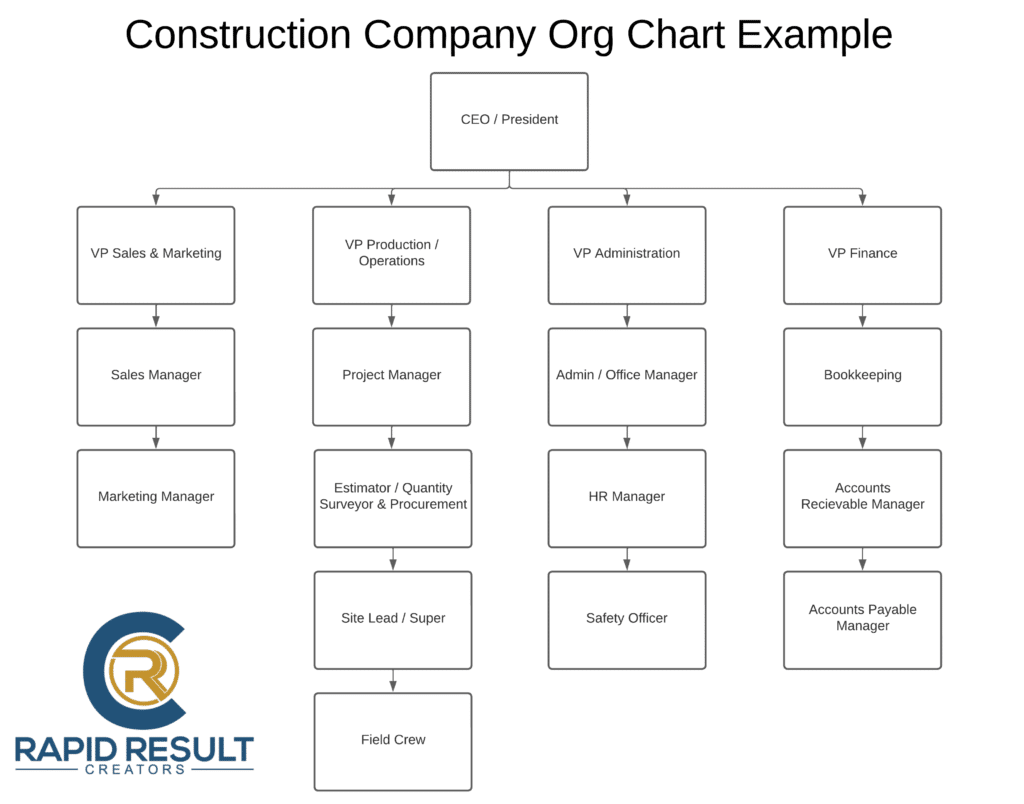
Start by creating a simple org chart. This doesn’t mean you have to hire a full management team tomorrow. The goal is to define the key roles your company needs to run smoothly, then assign names to each box (even if some names show up more than once).
Typical roles might include:
- Sales & Estimating
- Project Management
- Finance & Bookkeeping
- Marketing
- Office Administration
- Field Supervision
- Operations / General Manager
From there, prioritize what areas need systemization first. Ask:
- Which roles are most critical to your profitability?
- Where are the biggest inefficiencies?
- What’s most likely to cause a fire if not systematized?
- What role takes up most of the owner’s time?
You don’t need to systemize everything overnight. Just start with the top 1–2 roles where getting things documented and organized will create the biggest impact.
Pro Tip: Many contractors begin with Estimating and Project Management, since those directly affect job flow and profits.
Step 4: SYSTEMIZE – Create Repeatable Systems and Use Tech Wisely
With your priorities clear, it’s time to build the actual systems that will run your business like a well-oiled machine.
Here’s how to do it role by role:
- Write Standard Operating Procedures (SOPs)
Turn the refined task list from Step 2 into step-by-step instructions. Use bullets, checklists, or screen recordings, whatever works for your team. Focus on repeatability and simplicity.
Ask yourself: “If I had to do this 1,000 times, is this the way I’d want it done every time?”
This question forces you to think long-term, not just about what works, but what’s efficient, scalable, and sustainable. If it’s not how you’d want it done 1,000 times, it’s probably not the best system yet.
- Collaborate With the Team
Don’t create SOPs in isolation. Get input from the people doing the work. They’ll improve the process and be more likely to follow it. - Record Training Videos
Use screen-sharing tools like Zoom to show how tasks are done. Combine this with your written SOPs to create easy onboarding materials.
Pro Tip: You don’t need to reinvent the wheel for everything. For common or repetitive construction tasks, like how to frame a window opening or properly finish drywall, you can link to trusted YouTube tutorials you’ve pre-approved.
This saves time and still gives your team the guidance they need. Just make sure to review and curate the content so it matches your quality standards and preferred methods.
- Use Software to Automate and Track
Tools like Buildxact help automate estimates, track job costs, manage communication, and store important documents. This replaces piles of paperwork and reduces human error. - Organize It All in One Place
Set up a shared folder or platform (like Google Drive or a construction-specific dashboard) to store SOPs, templates, training videos, and checklists, so your team always knows where to find what they need.
By documenting and digitizing your business systems, you create predictability, scalability, and freedom.
You’ll no longer be the bottleneck for every decision and your team will have the tools and guidance to perform at a higher level.

🚀 Why MAPS Works for Growing Construction Companies
The MAPS Method isn’t just about getting organized, it’s about creating a business that can grow beyond you.
Here’s what happens when you implement it:
- You stop reacting and start leading
- Employees gain confidence and clarity
- Fewer mistakes and miscommunications
- Better margins and more consistent projects
- You can finally take a vacation without stress
- Your business becomes sellable, scalable, or transferable
In other words, MAPS helps you stop building a job and start building a real company.
🎯 Final Thoughts: Don’t Build Alone
Trying to organize your construction business without a clear framework is like trying to frame a house without a blueprint. You’ll waste time, lose money, and likely have to start over.
Whether you’re aiming to free up your time, increase profits, or step away from day-to-day operations, MAPS gives you the structure and path to get there.
🔗 Ready to Build a Self-Managing Construction Business?
If you’re serious about systematizing your business and stepping back from the chaos, don’t do it alone.
Join our free masterclass and learn how to build a business that works without you: