


We’ve all been there.
Every single schedule your team produces looks different.
Different assumptions, different dependencies, and planning approaches. Getting an understanding of what’s happening across the entire firm turns into a two-hour deep dive into dozens of spreadsheets.
Meanwhile, you’ve got clients calling asking why the move-in date just moved, and you’ve got no good answer for them.
A good construction schedule template is where this starts to get under control.
A construction schedule template is a structure already built around how residential jobs actually run, with the phases, task order, and dependencies a builder can adjust for their own project instead of building from scratch every time.
This guide gives you that template, a step-by-step process for adjusting it to your next job, and an honest answer to the question every builder eventually asks: at what point does a spreadsheet stop being enough?
Key Takeaways
- A construction schedule template maps tasks, durations, dependencies, and assigned crews across a project timeline.
- Four schedule types fit different situations: Gantt for day-to-day management, CPM for tight-deadline projects, look-ahead for sub coordination, and milestone for client and lender reporting.
- Building a schedule takes five steps: list every task from the estimate, set dependencies, assign durations and crews, add milestones and buffer, then review before sharing.
- Templates start to fail when schedules go stale, teams work from different versions, multi-job crew conflicts stay invisible, or the estimate and schedule live in separate files.
- Construction scheduling software connects the schedule to the estimate, updates dependencies automatically, and keeps crew and material visibility current across every active job.
Why Growing Firms Use Construction Schedule Templates
Residential projects are schedule-intensive.
Not only are you building the project schedule, but you need to coordinate permit timelines, trade availability and sequencing, and client communication.
That’s easy enough to keep on top of with one project. As you grow and have concurrent jobs running at different stages, all that schedule coordination requires a system. It needs to be standardized, and a construction template is what provides that standardization.
A good template keeps every project manager and crew lead working from the same structure, which makes multi-job coordination possible and ensures that small mistakes that end up costing you margin don’t happen in the first place.
It also speeds up schedule creation itself. Templates save 2-4 hours of setup per project compared to building from scratch, giving your team time back in their day to put into billable hours, improving your capacity utilization.
Types of Residential Construction Schedules
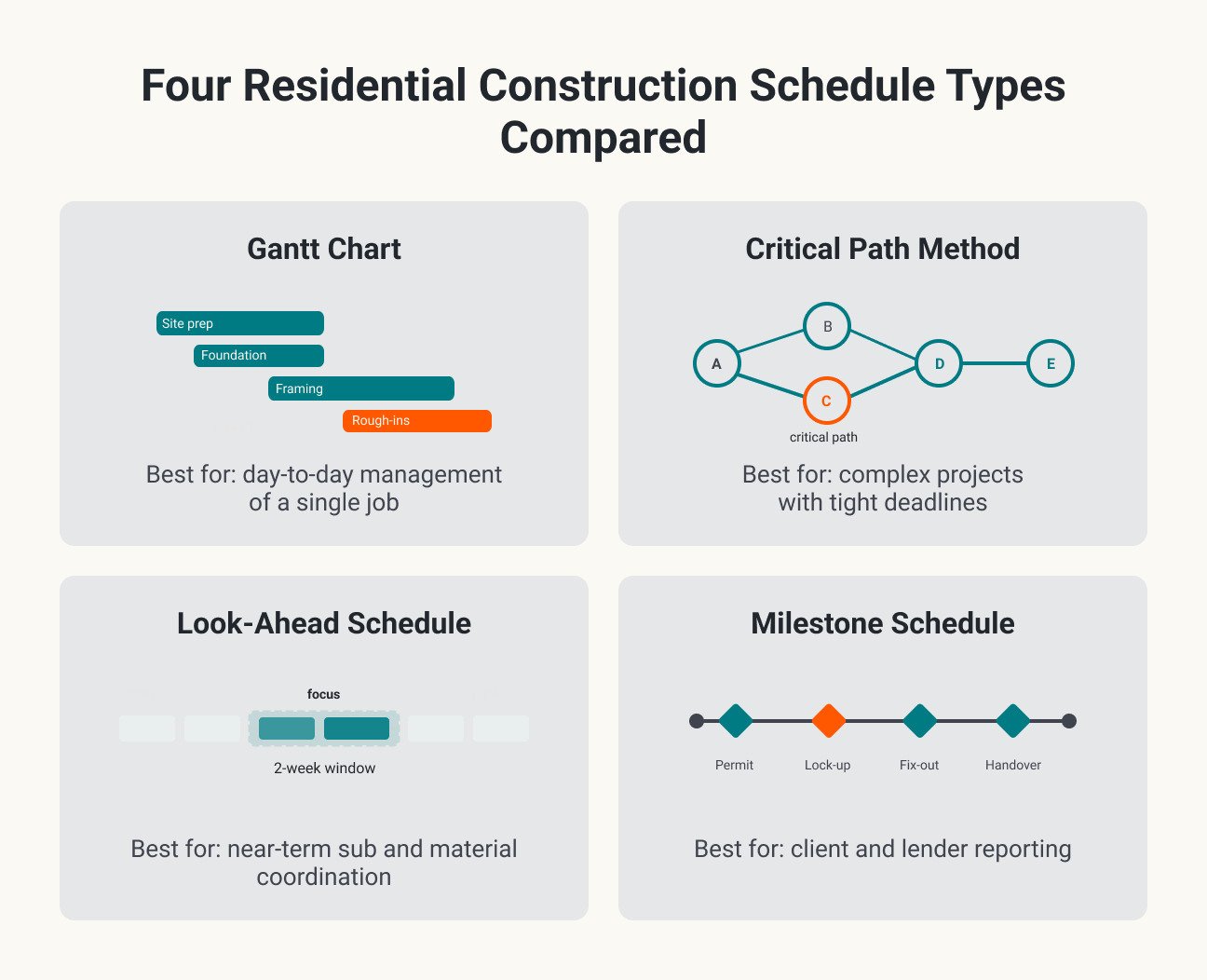
There are four key types of construction management schedules you can use for residential projects.
Each format fits a slightly different situation, which means as you scale and work on multiple project types at once, you’ll probably have several formats in play at once.
1. Gantt chart
A Gantt chart is a visual bar chart showing tasks across a timeline, with each bar marking a task’s start and end date. Overlapping bars show which tasks are happening at the same time.
Gantt charts work best for residential projects with 20 to 50 tasks and day-to-day management of a single job.
2. Critical path method (CPM)
CPM identifies the longest chain of dependent tasks in a project, called the critical path, which sets the earliest possible finish date.
Delays on that path delay the whole project, while delays on tasks outside of it usually have little to no impact on the final end date.
CPM is best used on complex projects with tight deadlines, where knowing which delays matter changes how you approach managing the program.
3. Look-ahead schedule
A look-ahead schedule is a rolling two to three-week window pulled from the full schedule, updated and rolled forward weekly.
It’s best for coordinating subcontractors and material deliveries on active jobs where the near-term picture changes often. You’ll use it alongside a full schedule view, such as a Gantt chart.
4. Milestone schedule
Milestone schedules provide a high-level view of the project timeline, showing only key dates (called milestones), such as permit approval, framing complete, and final inspection.
The schedule format is best used for client-facing updates and lender reporting. Here, your audience needs to know the job is on track, not how it is run day to day. A milestone schedule gives them only the information they need.
How to Build a Construction Schedule: The Step-by-Step Process Your Team Should Follow On Every Job
Standardizing construction schedules using a template is a great start. Having every person in the business responsible for creating schedules following the same process is even better.
Here’s the five-step process your team should be using to build construction schedules, whether you’re working with scheduling software, using a template, or starting from scratch.
Step 1: List Every Task from Your Scope of Work
Pull tasks directly from the estimate or bid, with every priced line item becoming a schedulable task.
Skipping this step is how tasks get missed entirely. If something doesn’t make the list, nobody is accountable for scheduling it, and it doesn’t end up on the schedule at all.
Step 2: Set Dependencies and Ordering
Identify which tasks must finish before others can start. For example, the foundation must cure before framing starts, and rough-in inspections need to be passed before insulation goes in.
Dependencies are what make a schedule react correctly when something slips. Without them, a delay in one task can’t move the tasks that depend on it, and everything falls out of sync with what’s actually happening on site.

Step 3: Assign Durations and Crews
Estimate realistic durations using real crew capacity information, and factor in trade availability.
For instance, if your electricians and plumbers are regularly booked two to four weeks out, then that lead time needs to be in the schedule. If not, you’re the one your team ends up calling when they’re stuck and need a plumber on-site urgently.
Step 4: Add Milestones and Buffer
Mark key checkpoints, such as permit inspections, client walkthroughs, and lender draws.
Make sure to add contingency time between phases, and add buffer to weather-exposed and inspection-dependent tasks first, since those are the phases most likely to slip for reasons outside your team’s control.
Step 5: Review and Share with Your Team
Finally, whoever creates the schedule should walk through it with the PM or lead carpenter on the project before sharing with subs.
Once reviewed, the schedule becomes the single version everyone works from. Everyone needs to understand that there is one live version, not several versions circulating by text and email.
Free Construction Schedule Template: Download for Excel and PDF
This construction schedule template is built around a 2,000 sq ft custom residential build, with 64 tasks already laid out across eight phases:
- Site prep
- Foundation
- Framing and dry-in
- MEP rough-ins
- Insulation and drywall
- Finishes
- Final inspections
- Punch list and closeout
Each row includes duration, start day, end day, the task it depends on, assigned crew, and status, with weekly Gantt bars that shift automatically when you update start day or duration. A job header up top holds the job name, client, address, and key dates.
There are a few small adjustments you might also want to make so that the template becomes more project-specific:
- Update durations for local conditions
- Add or remove tasks for project type (new build vs. remodel)
- Fill in crew/sub contact details
Download the construction schedule template here.
When a Template Stops Working: Signs You Have Outgrown Spreadsheets
Templates are a good starting point for standardization across projects, but they have some inherent limitations that mean as your business scales, you’ll want to be thinking about moving out of spreadsheets and into construction project management software.
If any of these three signals sound familiar, you might want to consider retooling.
Signal 1: Your schedule goes stale within days
If your schedule is already out of date within a few days, your spreadsheet is probably the culprit.
The biggest issue with spreadsheets is that they’re not equipped to absorb real-world disruptions like material delays, sub cancellations, or weather.
Once the schedule falls out of sync with the job, most builders stop updating it and revert to tracking progress in their head.
Signal 2: You are running multiple jobs and crew conflicts are invisible until they happen
A single spreadsheet handles one project fine.
Once you’re running more than two jobs at a time, your spreadsheets have no mechanism to flag conflicts, like the fact that the same crew or the same material delivery is booked on two jobs on the same day.
If people or assets are being double-booked regularly, spreadsheets might be to blame.
Signal 3: Change orders force manual rework of the entire schedule
When a homeowner adds or changes the scope mid-project, every downstream task has to be moved.
If your schedule lives in a spreadsheet, that has to happen manually.
Most builders don’t bother. The time it takes to manually update a spreadsheet for each change order isn’t worth it, so they just work from an outdated schedule.
Once that’s happening across a firm running multiple projects, you’ve got no idea where any project is really at, because your progress tracking method is broken.
What happens when you upgrade from a spreadsheet to scheduling software
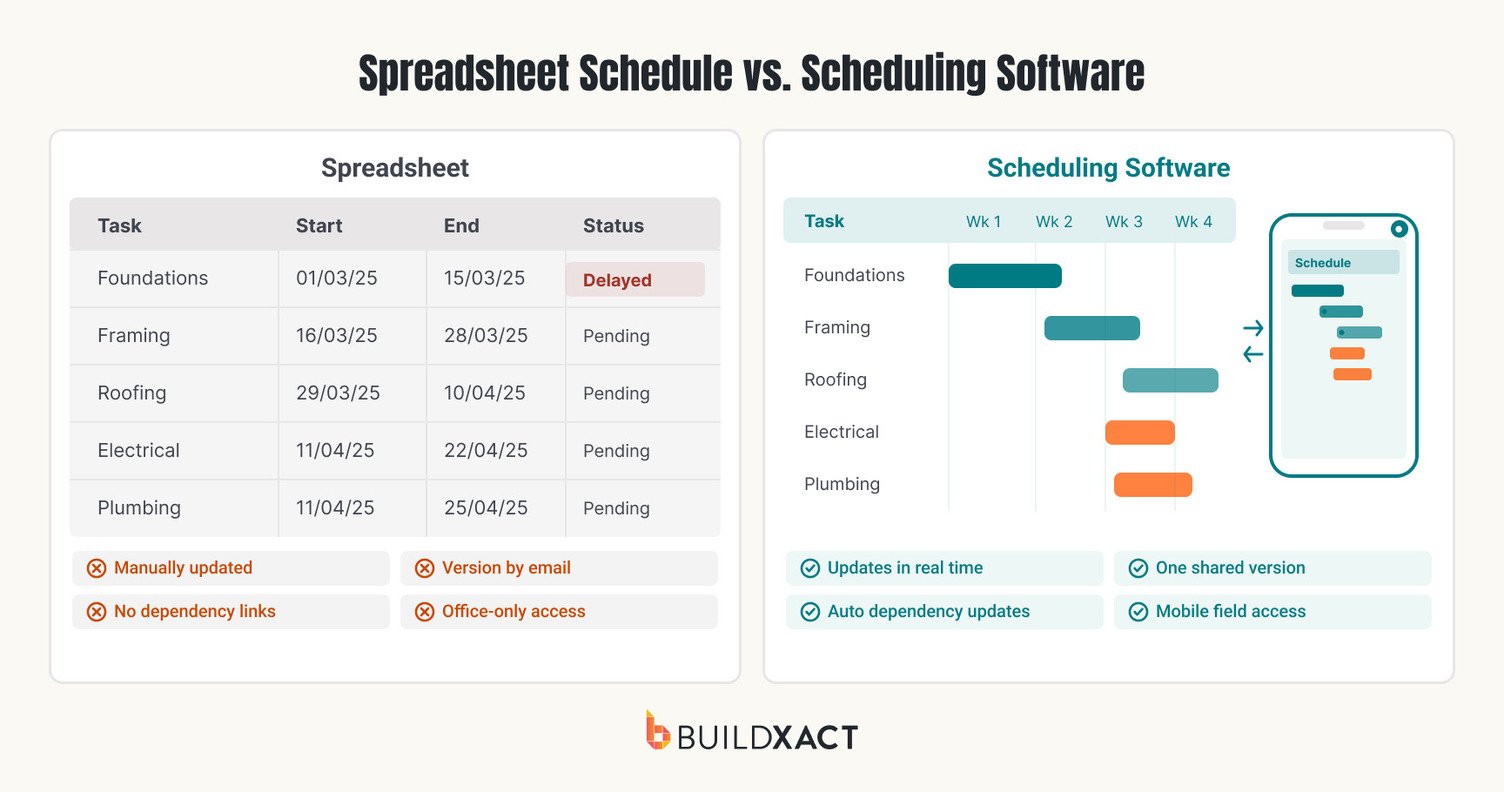
Purpose-built construction scheduling software directly addresses the limitations of managing timelines in spreadsheets:
- Drag-and-drop Gantt charts replace manually rebuilding a static timeline every time something moves
- Automatic dependency updates mean a delay on one task shifts every dependent task on its own
- Mobile field access keeps the schedule as one shared version, updated from the job site as changes occur
- Real-time team visibility means crew and material conflicts across multiple jobs are visible before they turn into a no-show
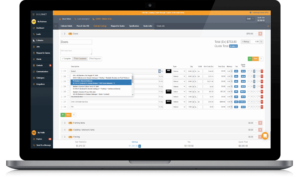
Buildxact builds the schedule from the estimate itself, so tasks priced into the job carry straight into the timeline instead of getting rebuilt by hand. Its part of why, according to our own data, builders using Buildxact save an average of 16 hours of admin time a month.
Construction schedule template vs. scheduling software: Which is right for you?
A schedule is only useful if it matches what’s actually happening on the job.
A template gets you organized today: tasks in order, durations that hold up, a version everyone on the crew is working from.
But the schedule you build in a spreadsheet still depends on someone catching every slip by hand, and the slips that go uncaught are the ones that eat into the margin you priced in.
If a construction schedule built on a spreadsheet works for you now, download the free template and build your next job on it.
When you’re ready for a schedule that updates itself as the job moves, Buildxact’s scheduling software keeps it tied to the estimate it came from, so the plan you’re working from stays the plan that protects your numbers.
Book a demo to learn how Buildxact can help you protect margins by keeping schedules accurate as each job progresses.