

The best AI estimating software for established residential builders and remodelers is Buildxact, with Blu helping builders measure plans, prepare estimates and check for potential mistakes before bidding. Togal.AI is particularly suited to AI takeoffs, while Beam AI and Kreo offer additional estimating capabilities for different contractor workflows.
You’ve got several jobs underway, a crew to manage and more bids waiting to go out. But you’re still the one pricing most of the work, often after everyone else has finished for the day.
AI estimating software can help you get bids out faster and take on more opportunities. The challenge is finding a tool that goes beyond measuring plans to help you build accurate estimates with current material pricing. Missed items and outdated costs can eat into your planned margin before a job even starts.
We’ve compared eight AI estimating tools to see how far each takes residential builders from plans to a finished bid. Here’s what they do well, where you’ll still need to step in and which tools are best suited to your business.
Key Takeaways
- The best AI estimating software helps builders move from plans to accurate, priced bids faster, with opportunities to check quantities, costs and missing items.
- Buildxact is the best fit for established residential builders and remodelers. Its Blu AI supports takeoffs, estimate generation, assemblies and estimate review, with builders approving the final numbers.
- Togal.AI focuses on AI takeoffs, while Beam AI and Kreo also offer estimating capabilities.
- Bluebeam specializes in drawing review, while On-Screen Takeoff, STACK and PlanSwift combine takeoff and estimating capabilities with varying levels of AI assistance.
- When comparing tools, prioritize residential fit, pricing accuracy, builder oversight and the steps needed to complete a bid.
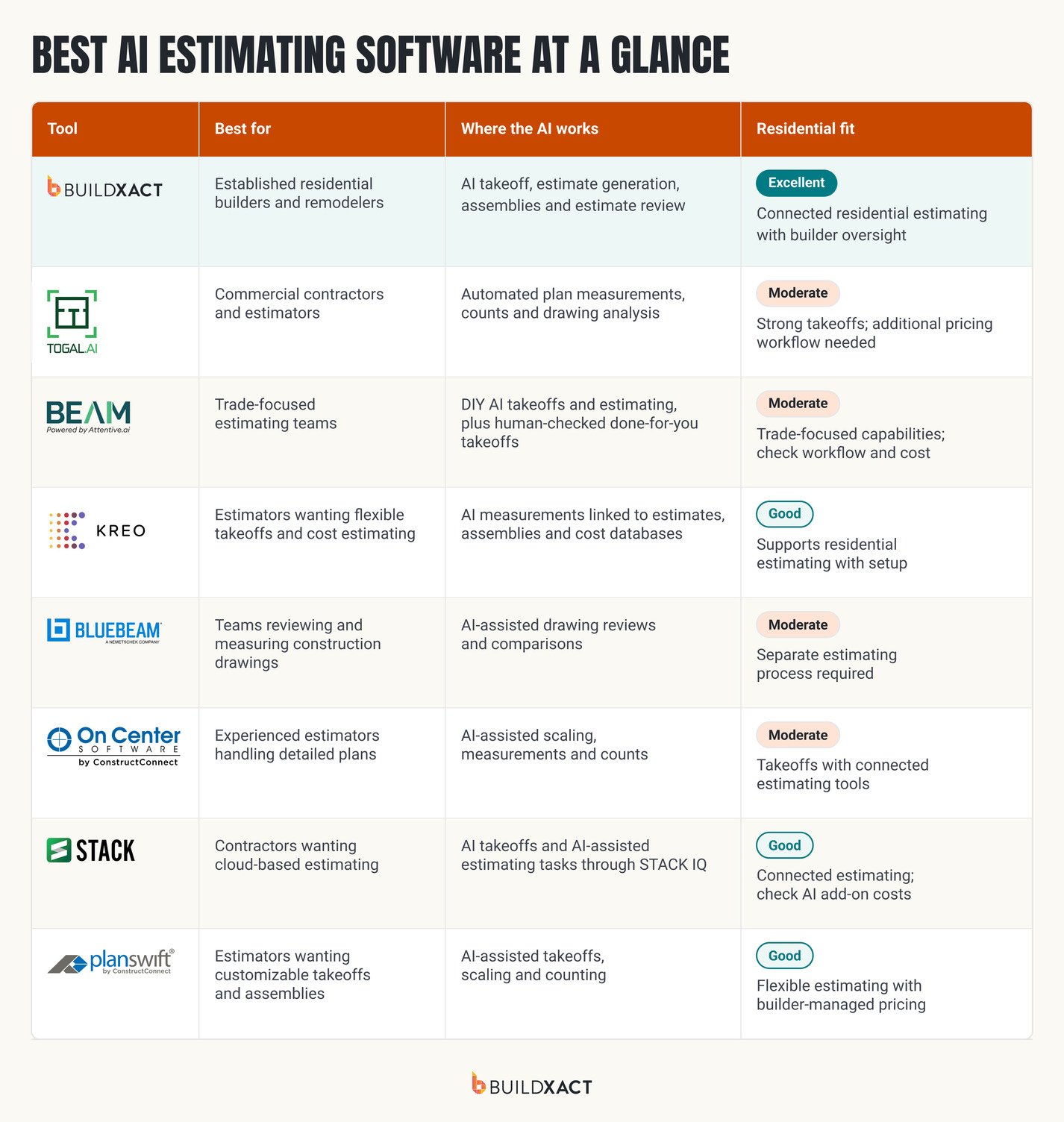
Best AI Estimating Software at a Glance
The best AI estimating software can help you get more bids out without spending extra hours measuring plans and working through costs. But not every tool does the same job. Some focus on takeoffs, while others help you build and check fully priced estimates.
Buildxact is the best choice for established residential builders and remodelers who want to bid faster while protecting planned margins. Its AI Construction Assistant, Blu, helps with takeoffs, estimate generation and checking for potential mistakes, while you stay in control of the final numbers.
Other tools serve different needs. Togal.AI focuses on automated takeoffs, while Beam AI and Kreo also offer estimating features. STACK combines cloud-based takeoffs and estimating, and Bluebeam, On-Screen Takeoff and PlanSwift provide tools for measuring and reviewing plans.
Here’s how the eight platforms compare on AI features, residential fit and the work involved in getting a bid ready.
What to Look for in AI Estimating Software
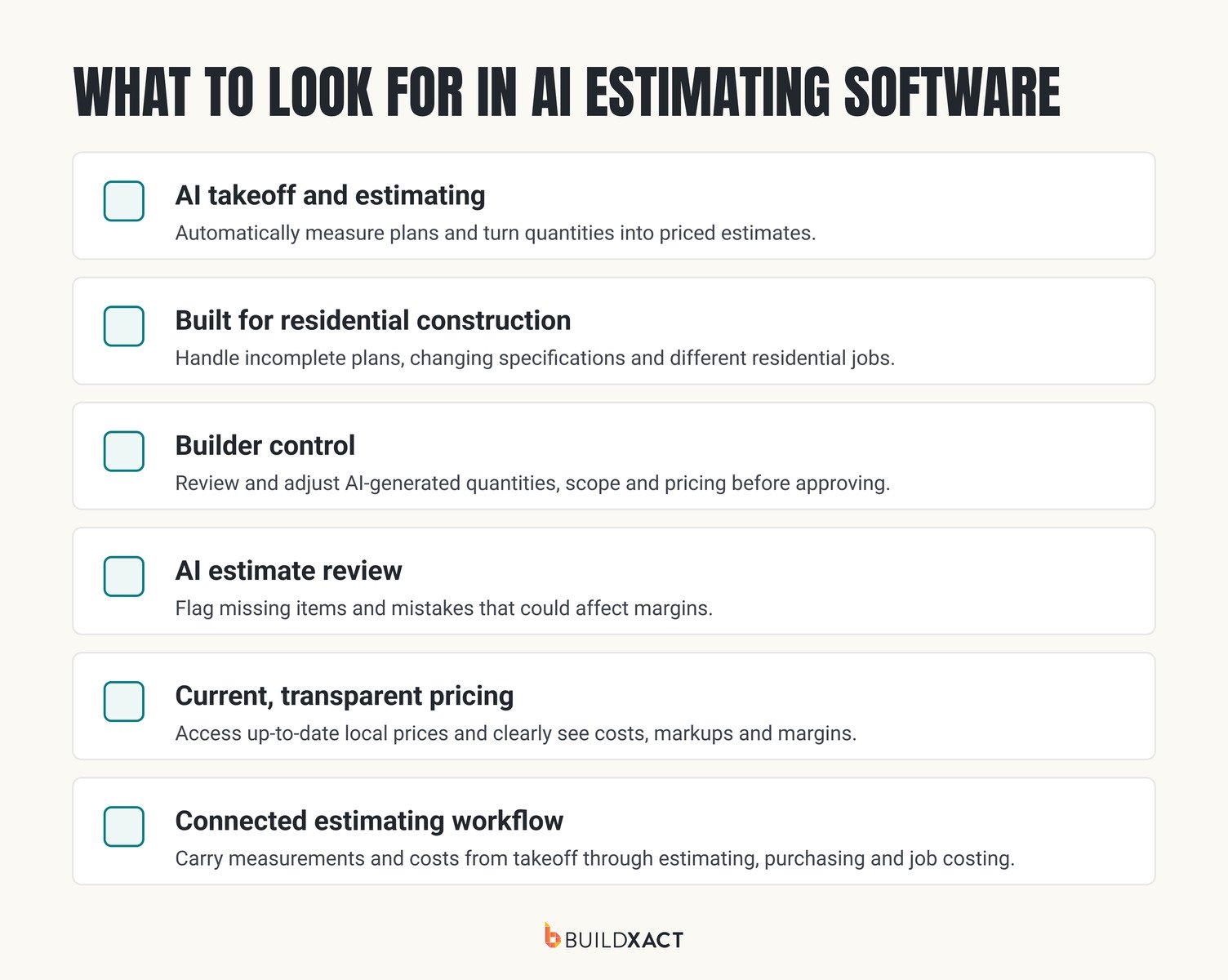
When comparing AI estimating software, it’s important to look beyond how quickly a tool measures plans. The features that matter most are those that help you build accurate estimates, check the numbers and stay in control of what goes into each bid.
AI takeoff and estimate generation
Opt for tools that automatically measure areas, count materials, and use those quantities to build an initial estimate. The more information it carries directly from the takeoff into your estimate, the less time you’ll spend entering figures again or checking whether something got missed along the way.

Built for residential construction
As any residential builder knows, jobs often come with incomplete plans, changing specifications and plenty of variations between projects. Choose software that can handle these realities and fits the way your business operates, without requiring complicated setup or processes designed for large commercial contractors.
AI assistance with builder control
You need to know where the numbers in your estimate come from. Look for AI tools that show you where quantities and costs came from, then let you make changes where needed. You should always be able to adjust the scope, allowances and pricing before approving a bid.
AI estimate review
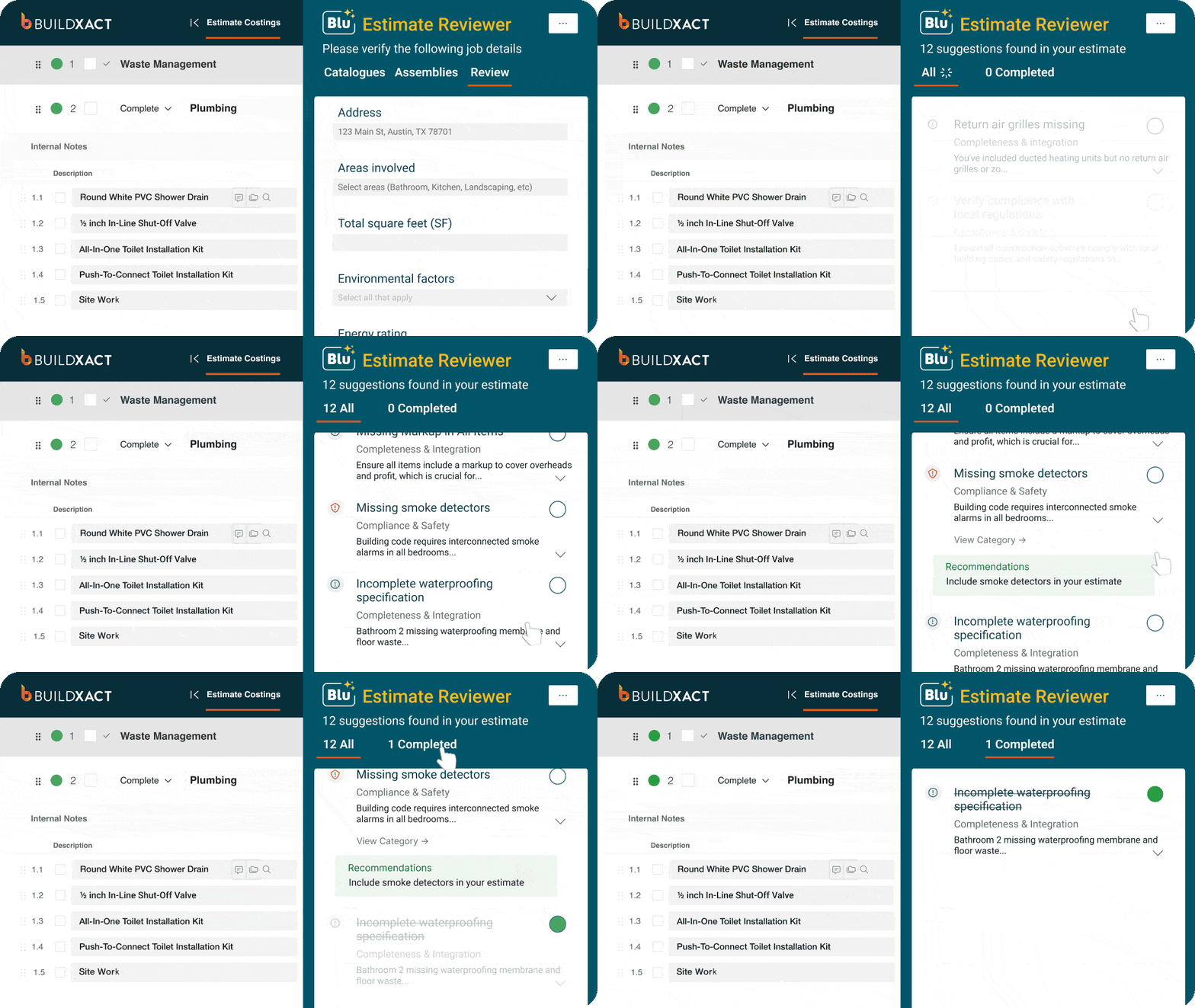
Even experienced builders can overlook items when they’re juggling several estimates. AI review tools can help flag missing materials, inconsistent quantities or pricing errors before a bid goes out. Catching these issues early can help prevent unexpected costs from eating into your planned margin.
Clear and current pricing
Material costs can change between preparing an estimate and starting a job. Look for software that uses up-to-date supplier pricing and makes it easy to check costs. You should also be able to see and adjust your markups and margins before sending a price to the client.
Keep track of estimated profit margins
A competitive bid still needs to leave enough profit in the job. Your estimating software should show your expected margin as you build the estimate and let you see how changes to labor, materials or subcontractor costs affect it. This helps you assess whether a job is worth taking on before you commit to a price.
Connected estimating processes
Measurements, quantities and costs should flow from takeoff to the final estimate without you needing to enter the same information twice. It’s also worth checking whether the software connects estimates with purchasing, scheduling and job costing, so you can keep using those numbers once the project gets underway.
So how do the leading tools measure up against these requirements? Here’s a closer look at eight options, including where their AI can save you time and where you’ll still need to do the work yourself.
The 8 Best AI Estimating Software Tools for Builders
The tools below serve different types of contractors, with varying levels of AI automation and estimating functionality. Some are built for commercial estimating teams, while others are better suited to residential builders.
We’ve broken down what each tool offers, where its limitations lie, and what you can expect to pay, so you can narrow down the options for your business.
1. Buildxact: AI that carries the job from plans to bid
Best for: Established residential builders and remodelers managing multiple jobs who want to get more bids out without taking on extra estimating staff.
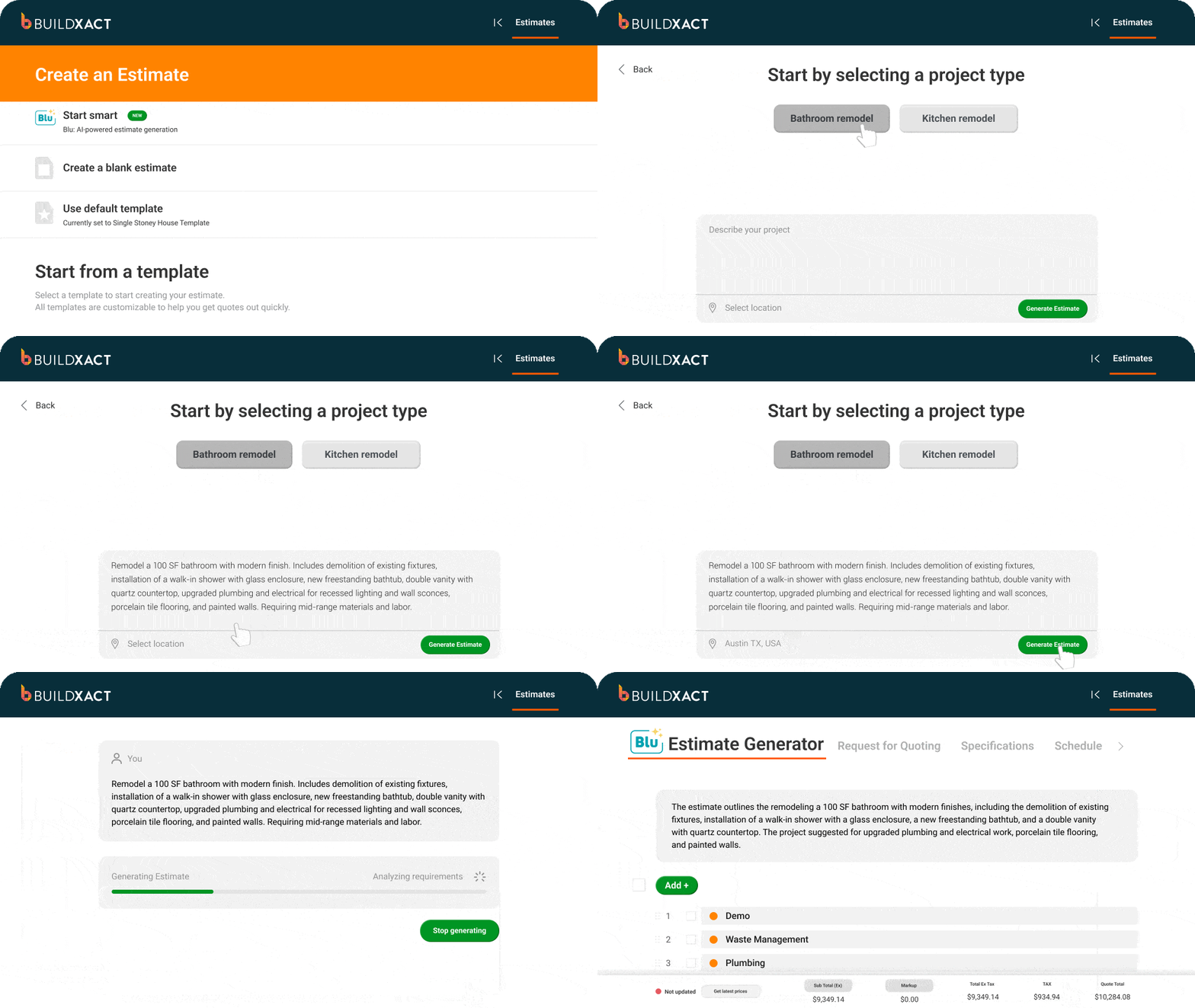
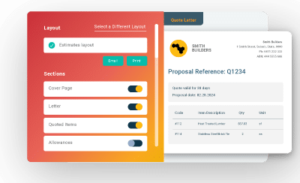
Buildxact brings takeoffs, estimating and job management together in one platform built for residential construction. Its Blu AI assistants help you work through estimates faster, while you stay in control of the scope, costs and final bid.
Where the AI works
Blu is Buildxact’s AI construction assistant, designed to help residential builders spend less time estimating and get more bids out.
It works like a new hire: you’ll need to check its work closely at first, but as you become familiar with its capabilities, it can take more of the repetitive work off your plate.
Four Blu assistants support different stages of estimating:
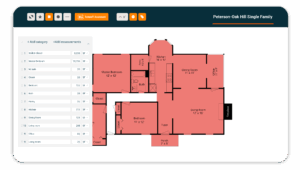
- Blu Takeoff Assistant: Identifies and scales plan pages, detects rooms and measures quantities for you to review.

- Blu Estimate Generator: Creates an editable starting estimate using project details and location.

- Blu Assembly Assistant: Helps build reusable assemblies with materials, labor and pricing.
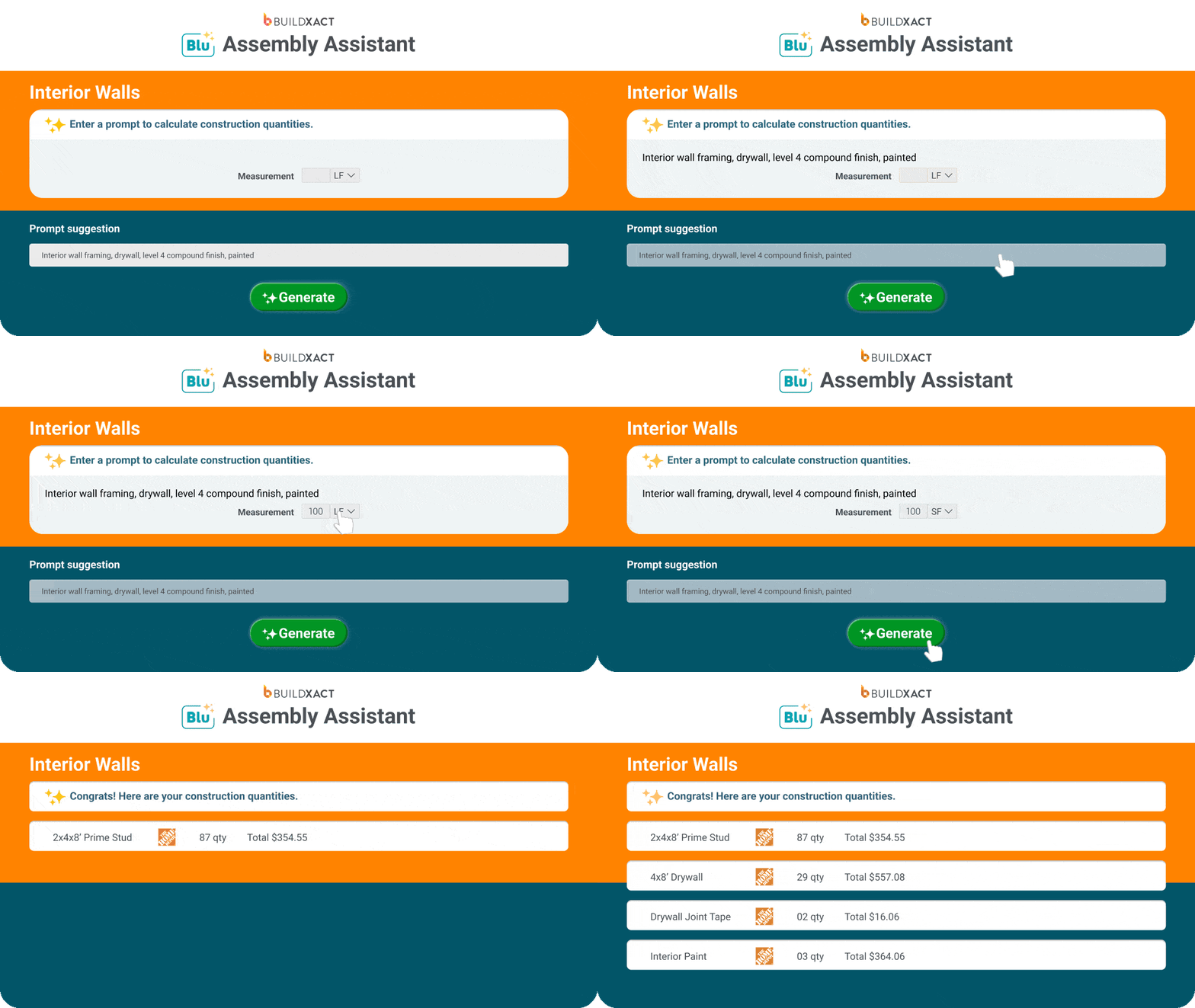
- Blu Estimate Reviewer: Flags potential missing items, inconsistencies and markup issues before you send a bid.

Pros
- Speeds up estimating, with Blu reducing time spent measuring and counting materials by 65%, according to Buildxact data.
- Helps protect planned margins by giving builders the ability to check and adjust scope, quantities, allowances and pricing before bidding.
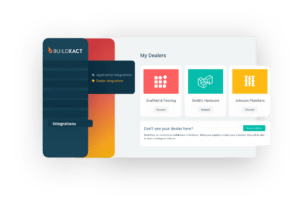
- Connects estimates to purchasing and job costing, with Home Depot dealer pricing helping builders work with current material costs.
- Makes it easier to grow without increasing software costs for every new team member, thanks to unlimited users.
Cons
Buildxact is designed for residential builders, so it’s less suited to large commercial contractors with complex enterprise estimating requirements.
Pricing
- Foundation ($199/month): Includes digital takeoffs and Blu Assembly Assistant. Estimate Generator is available as an add-on.
- Pro ($399/month): Adds Estimate Generator, scheduling and job management. Takeoff Assistant and Estimate Reviewer are optional add-ons.
- Master ($599/month): Includes all four Blu assistants.
Cutting estimating time with Buildxact
Residential builders are seeing real time savings on their estimates with Buildxact. John Beiler of Northwoods Construction cut his whole-house estimating time from 10 hours to four, while Joe Dodson of Dodson Construction reduced the time spent estimating a bathroom remodel from 90–120 minutes to just 20–25 minutes.
2. Togal: fast AI takeoff for commercial plan sets
Best for: Commercial contractors and estimators working with large construction plan sets.

Togal uses AI to speed up the measuring and counting involved in preparing construction takeoffs.
Where the AI works
The tool automatically detects and measures areas, rooms and quantities from uploaded drawings. Estimators can review the results and make adjustments before using the measurements to price a job.
Pros
- Cuts down repetitive measuring work across large plan sets.
- Lets estimators check and adjust AI-generated measurements.
Cons
- Primarily designed for commercial construction rather than residential builders and remodelers.
- Focuses on takeoffs, so you may need separate estimating software to turn quantities into fully priced bids.
Pricing
- Growth plan: $299 per user/month, billed annually.
- Business plan: Custom pricing for teams of four or more.
Verdict: A strong option for commercial takeoffs. Residential builders should factor in the extra software and work needed to turn measurements into a complete, priced estimate.
3. Bluebeam: PDF markup with takeoff tools
Best for: Builders and estimators who regularly measure, mark up and compare construction drawings.

Bluebeam helps construction teams work with digital plans, from checking measurements to reviewing drawing changes.
Where the AI works
Bluebeam Max adds AI-assisted drawing reviews to help identify potential issues and compare plan revisions. Standard takeoff tools let estimators measure areas, lengths and quantities directly from PDFs.
Pros
- Strong PDF measurement, markup and drawing comparison tools.
- AI-assisted drawing checks available with Max.
Cons
- Doesn’t offer a complete AI-powered process from plans to priced bids.
- AI features are concentrated in the higher-priced Max plan.
Pricing
All prices are per user, billed annually:
- Basics: $21.67/user/month.
- Core: $27.50/user/month.
- Complete: $36.67/user/month.
- Max: $49.17/user/month (introductory pricing; includes AI features).
Verdict: Useful for checking plans and measuring quantities, but you’ll still need a way to turn those measurements into priced bids.
4. On-Screen Takeoff: Long-running desktop takeoff [150w]
Best for: Experienced estimators and trade contractors working with detailed construction plans.

On-Screen Takeoff helps estimators measure quantities from digital drawings, with AI tools to reduce manual takeoff work.
Where the AI works
The tool’s Takeoff BOOST feature uses AI to automate measurements and counts from construction drawings. Estimators can review the results and make adjustments before using the quantities to prepare bids.
Pros
- Detailed takeoff tools with AI automation.
- Integrates with Quick Bid for estimating.
Cons
- Primarily geared toward commercial and trade estimating.
- Desktop software may be less convenient for smaller residential teams.
Pricing
- On-Screen Takeoff uses custom pricing based on team size and features.
- A 14-day free trial is available.
Verdict: Strong for detailed takeoffs, but less suited to residential builders looking for one connected estimating system.
5. Beam AI: AI takeoffs with human quality checks
Best for: Contractors and estimating teams looking to outsource time-consuming takeoffs.

Beam AI helps contractors cut down the hours spent measuring plans, with options for both self-service takeoffs and takeoffs handled by Beam’s team.
Where the AI works
Beam uses AI to measure quantities from uploaded construction drawings. With its done-for-you service, Beam’s team checks the measurements before returning the takeoff. Contractors can also use its DIY tools to complete takeoffs themselves.
Pros
- Reduces the time estimators spend measuring and counting materials.
- Offers human quality checks with its done-for-you service.
Cons
- The done-for-you service offers less hands-on involvement for builders who prefer to complete every takeoff themselves.
- Doesn’t provide the same connected residential estimating and job management workflow as a tool like Buildxact.
Pricing
All plans are billed annually:
- DIY construction plans: From $666.67/month per trade.
- Done-for-you construction plans: From $2,083.33/month, depending on trade and volume.
- Enterprise: Custom pricing.
Verdict: Worth considering if you want takeoffs handled for you, but less suited to residential builders looking for one system to estimate and manage jobs.
6. STACK: Cloud takeoff and estimating
Best for: Contractors and estimating teams wanting cloud-based takeoffs and bids.

STACK brings takeoffs, estimating and proposals together in an online platform, so teams can work on bids from different locations.
Where the AI works
STACK’s AI tools detect rooms, walls, doors and windows to speed up measurements. STACK IQ also lets estimators use ChatGPT or Claude to review estimates and manage takeoff tasks.
Pros
- Connects takeoffs, cost estimates and proposals.
- Offers regional cost data and AI-assisted estimating tasks.
Cons
- Built for multiple construction trades rather than specifically for residential builders.
- Some AI takeoff features cost extra, and paid licenses are priced per user.
Pricing
All plans are billed annually:
- Premium: $249/user/month for takeoff tools and AI assistance.
- Pro: $299/user/month for integrated estimating and proposals.
- Custom: Pricing based on team requirements.
- Some AI features are available as paid add-ons.
Verdict: A strong cloud-based estimating option, though residential builders should check the cost of AI add-ons and whether the workflow suits their jobs.
7. Kreo: AI takeoff from 2D drawings
Best for: Contractors and estimators wanting faster takeoffs and flexible cost estimating tools.

Kreo helps estimators measure construction drawings and turn those quantities into cost estimates.
Where the AI works
Kreo’s AI detects rooms, walls and other elements in 2D drawings, reducing the time spent measuring and counting. Estimators can review the quantities and use Kreo’s estimating tools to calculate costs.
Pros
- Speeds up measuring and counting from 2D plans.
- Supports cost estimates using measured quantities.
Cons
- Builders need to set up and check pricing rather than rely on a ready-made residential pricing workflow.
- Less tailored to established residential builders managing several jobs.
Pricing
All plans are billed annually:
- Essential: $100/month (without AI).
- Pro: $175/month (includes AI takeoff).
- Business: $250/month per user (five-seat minimum).
- Enterprise: Custom pricing.
- A seven-day free trial is available.
Verdict: A capable AI takeoff and estimating tool, though its broader focus means residential builders may need to do more work setting up their pricing process.
8. PlanSwift: Desktop takeoff with assemblies
Best for: Builders and estimators who want detailed takeoffs and control over their estimating setup.

PlanSwift combines digital takeoffs with customizable estimating tools, allowing builders to measure plans and calculate material and labor costs.
Where the AI works
PlanSwift’s Takeoff BOOST feature uses AI to measure areas and lengths, count materials, scale drawings and link plan sheets. Builders can review and adjust the results before using the quantities to price a job.
Pros
- Combines AI-assisted takeoffs with customizable material and labor assemblies.
- Supports pricing and estimating within the same software, including Excel integration.
Cons
- Windows-only desktop software, with no browser-based option.
- Builders must set up and maintain their own pricing and assemblies.
- Full AI Auto Takeoff requires the higher-priced Core plan.
Pricing
All plans are billed annually:
- Essential: $166.67/month, including Auto Count, Auto Scale and Auto Bookmark.
- Core: $250/month, including the full Takeoff BOOST suite with Auto Takeoff.
- A 14-day free trial is available.
- Additional seats are discounted.
Verdict: A strong choice for builders comfortable managing their own estimating setup, but less suited to those wanting a connected system built specifically for residential construction.
Pick the Tool That Gets You to a Signed Bid
Before choosing AI estimating software, consider how much work you’ll still need to do after the AI finishes its part. Can you move straight into pricing and preparing your bid, or will you need to transfer information between different tools?
For residential builders without a dedicated estimator, Buildxact brings these steps together. Blu helps handle the time-consuming work, giving you more capacity to bid on new jobs without adding to your team.
To see how Buildxact can help you get more bids out in less time, book a demo or start for free.
AI Estimating Software: FAQ
Can ChatGPT do construction estimates?
ChatGPT can help organize project information, calculate costs and draft estimates using details you provide. However, it can’t reliably measure construction drawings or verify current material prices on its own. Dedicated construction estimating software offers more reliable takeoffs, pricing tools and checks to help builders prepare accurate bids.
Will estimators be replaced by AI?
AI can handle time-consuming estimating tasks like measuring plans, counting materials and identifying potential omissions. However, experienced estimators are still needed to check quantities, assess project requirements and approve pricing. For residential builders, AI can increase estimating capacity without necessarily hiring additional staff.
Which software is most commonly used for estimating?
Popular construction estimating tools include Buildxact, STACK, PlanSwift, Bluebeam and On-Screen Takeoff. The best choice depends on the type of construction work and the estimating process. Residential builders may prefer software that connects takeoffs and estimates with purchasing, job costing and project management.
Is there a free app that can create estimates?
Yes. Some construction estimating platforms offer free plans or trials. Buildxact’s free Go plan includes five AI estimating credits, allowing residential builders to try AI-assisted estimating before choosing a paid subscription. Check what’s included, as free plans often limit projects, features or the number of estimates you can create.