

AI in construction management, for a residential builder, means software that drafts estimates, measures plans, and flags missed items so you can check and approve the numbers instead of building them from scratch.
Most of what you hear about AI in construction management is for the enterprise commercial construction company.
Drones mapping a hospital site. Robots laying blocks. Cameras checking a 40-story tower against a BIM model. Useful, maybe, if you have a data team and a tech budget.
Less relevant for the residential builder working on new homes and remodels.
Your week looks different. Your crews are on three jobs, and you are the one pricing the next one after dinner. Every bid starts with the same plan pages, the same measurements, and the same hunt for current material prices.
If a line is missing or a price is stale, profit margin for that job is on the line.
That is where AI earns its keep for a residential builder. Not on the site, but at the estimating desk, where your evenings go, and your profit gets set. This guide walks through four practical applications of AI in construction management: estimating, takeoffs, cost monitoring, and schedule tracking, using Buildxact’s Blu as the working example.
Key Takeaways
- The most practical application of AI in construction management for residential builders: drafting estimates faster from plain descriptions, with final numbers left to your review.
- Auto-measure plan areas in seconds while you verify drawing scale and revision.
- Flag missed lines or price outliers before bidding, then track actual costs once the job is won.
- Turn approved estimates directly into your starting task list and budget schedule.
- Onboard AI step by step like a new hire while maintaining full control over your bids.
How Can AI Speed Up Residential Estimating?
AI speeds up residential estimating by turning a plain description of the job into a structured first-pass estimate you can then edit and price.
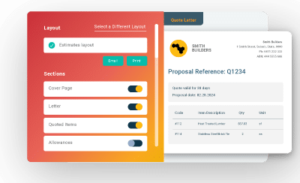
Take Blu: Estimate Generator as an example. Trained on over 180,000 real residential jobs, Blu takes a project described in your own words, the project type, and the location, and returns an editable estimate already broken into tasks with labor, material, and service line items.

You set the scope, add exclusions and allowances, confirm labor rates, and set tax, overhead, contingency, and markup. Blu produces the draft, and you approve the number. It currently generates estimates for kitchen and bathroom remodels, with more project types such as full-home builds and extensions rolling out.
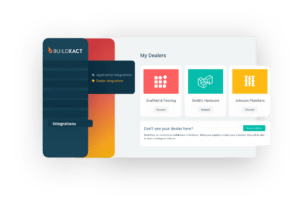
Blu’s pricing draws on local and regional labor and material data, with real-time pricing pulled from connected dealer catalogs including The Home Depot, so the draft reflects current prices in your area.
“If you’re trying to solicit multiple vendors, you always get different pricing weeks apart, days apart, and all of that adds timeline to your build-out. Whereas if you’ve got The Home Depot tied to Buildxact, it’s an instant thing. You click it, and in a couple of seconds, it’ll load, and it’ll populate whatever’s in that estimate with the latest Home Depot price, and it’ll lock it into that price.”
— Joshua Bradley, Bradway Construction, Builder grows more than twofold with The Home Depot
For residential builders, AI estimating tools like Blu remove the repeated line entry and blank-page start point and help you win back those evenings spent putting estimates together by hand.
Can AI Handle Your Takeoffs?

AI handles the measuring and counting on a digital takeoff. It can auto-scale a plan and measure room areas in seconds, then you just need to confirm the drawing and check anything the tool can’t read.
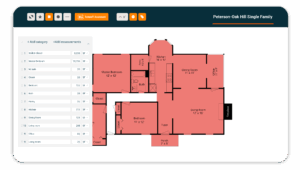
Blu: Takeoff Assistant works from uploaded digital plans. It auto-names plan pages by area such as kitchen, bathroom, and garage, auto-scales them, and auto-measures room floor areas by outlining each room and calculating square footage.
You confirm the scale and the drawing revision before moving forward with any quantity, and check irregular areas and symbols. A point-edit tool then lets you refine any measurement without having to restart the takeoff from scratch, and measurements can be reused across different material and labor lines in the estimate.
By using Blu, alongside other Buildxact features, residential builders cut the time it takes to measure and count materials by 65%.
Where Does AI Fit in Cost Monitoring?
In cost monitoring, AI can catch problems in the estimate before the bid goes out. Ordinary budgeting software then tracks costs once the job is won.
Blu: Estimate Reviewer analyzes a completed estimate and flags missed items, odd quantities, and price outliers, tailored to the job by details you add (such as room type or environmental factors).
It works like a step-by-step checklist that runs through an estimate you’ve already built and looks for any line items you might have missed that would otherwise become a cost you’ll have to absorb down the line.
The reviewer suggests line items it thinks you may have missed, but you ultimately decide which flags are real, confirm prices are still current, and sign off on the final number.
Once the job is won, Buildxact’s budget tracking tools allow you to follow how actual costs play out against the original estimate, so you can spot risks to margin as they happen, and do something about them while you still have the chance.
What Can You Expect From AI for Schedule Tracking?

AI scheduling tools do exist, but most of them are built for a large commercial contractor. For example, commercial AI scheduling software tends to be built around delay forecasting using site sensor data, which is overkill for the typical residential builder.
For a residential builder, the bigger win comes earlier, in an accurate estimate that becomes the job’s task list and budget.
Once you approve an estimate in Buildxact, it turns into the starting task list and budget for the job, so the schedule is built from real, costed tasks instead of a blank calendar. You sequence the tasks and commit the schedule from there, tracking it with Buildxact’s Gantt charts and reminders.
You sequence and commit the schedule yourself, and it all stays linked to that original estimate, so that labor and task planning are always connected to the number you bid, and any changes down the line are visible as risks to the job’s final profit margin.
How to Get Started With AI in Construction Project Management
AI assistants are already widespread in construction management software, and more and more tools are being developed each month.
For many residential builders, the question is less about which tools exist, but whether they’re trustworthy enough to use on a live job.
Dodge Construction Network’s December 2025 AI for Contractors report found that 87% of contractors expect AI to meaningfully affect the industry. The twist is that only 19% have adapted their workflows and are using AI to improve construction management.
Why?
57% of those same contractors name accuracy of AI output as a key concern. In short, AI in construction management has yet to gain the trust of many.
One of the reasons behind this lack of trust is a mismatch between expectation and reality. Builders test an AI tool on a first estimate, and it produces something good, but not perfect, so they write it off as being “not quite there yet”.
Consider, though, how this would look different with a new hire.
If you were to onboard a junior estimator, you’d expect that exact type of result. You’d expect them to produce an estimate that is pretty good, but still needs a bit of fine-tuning. Part of that comes down to a lack of familiarity on their part with your customers, business, and preferences, and part of it depends on your ability to clearly communicate what you’re looking for.
AI construction assistants should be introduced with that same mindset. Treat it the same way you would treat a capable new hire:
- Supervise everything at first
- Show them the difference between their initial output and what you consider perfect for that job
- Fine-tune your instructions each time
- Hand over more of the routine work as it proves reliable
- Keep final approval yourself
Here’s an example of how growing residential builders get started with Buildxact Blu’s AI capabilities:
- Weeks 1 to 2: Run Blu alongside the usual method on two or three jobs and compare every line.
- Weeks 3 to 4: Let Blu draft routine assemblies and review the exceptions Estimate Reviewer flags.
- Month 2 onward: Save corrected assemblies as templates so each new estimate starts closer to right.
You still retain ultimate control over output. At every stage, you approve scope, quantities, prices, and markup before anything goes out to a client.
AI-Driven Estimates Save Time and Protect Margins
Your 9 p.m. estimating session isn’t going away instantly just because a new tool showed up.
What changes is how much of it starts from a blank page: a plan description that becomes a structured first-pass estimate, a takeoff that measures itself in seconds instead of an hour, a finished bid that gets checked for missed lines before it goes out.
That’s the work AI is actually good at for a residential builder.
Builders using Buildxact win 1 in 3 bids, against 1 in 6 without it, and that starts with getting an accurate, complete estimate out the door faster.
Book a demo to see how Blu can speed up your estimating.
FAQ
Is AI going to take over construction management?
No, not in the sense of running the job without you.
AI tools are good at narrow, repetitive tasks: reading a drawing and measuring it, drafting a first-pass estimate from a description, scanning a finished estimate for missed lines or outlier pricing. They’re not made for judgment calls like what a job is really worth, what to exclude, or what markup covers your risk on a specific client. Those stay with the builder.
Take Blu. It drafts and flags; you approve. Treat it like a new hire: useful from day one, trusted with more as it proves itself, never making the final call on its own.
What is the best AI for construction project management?
The tools worth evaluating share three things.
- They’re trained on real residential construction data
- They work inside the estimate itself
- They pull live pricing from the dealers you actually buy from
Blu is a great example. It was trained on 180,000 real residential jobs, with their real costs and margins attached, and it pulls pricing from connected dealer catalogs, including The Home Depot.
Can ChatGPT do construction takeoffs?
Not reliably.
ChatGPT learned from the open internet, so it has no grounding in how a specific plan scales or what materials cost at your dealer this week. Measuring a floor plan accurately means reading the drawing’s scale and revision correctly, and pricing a takeoff means pulling current numbers, not averages from training data.